

Audience: Compliance officers, embedded firmware leads, and OEM product managers who must explain to a buyer why a $4.20 reading pen performs an ECDH P-256 key exchange during first-time pairing, what that means for COPPA, GDPR-K, and PIPL, and how to choose between Just Works, Numeric Comparison, Passkey Entry, and Out-of-Band for a given market.
The Bluetooth pairing model on a reading pen is one of the few places where a low-cost consumer toy and a payment-terminal-grade security primitive share the same silicon. From the Q6/Q8 firmware 3.3.1 stack to the F8 firmware 3.1.2 stack, every ODM shipment since 2023 (47,000+ units, 47 countries) performs an ECDH P-256 key exchange on first bond. We have done this because the alternative — Legacy Just Works with no Man-in-the-Middle protection — is the failure mode the Bluetooth SIG specifically designed SSP to remove, and because it is the only credible answer to a buyer's CISO who reads the COPPA, GDPR-K, and PIPL language carefully.
This article explains exactly what SSP does on the reading pen, what LE Legacy does instead, what LE Secure Connections adds on top of SSP, and how we tune the user experience so a 6-year-old in a classroom or an 80-year-old at home can pair without friction.
1. The Three Pairing Generations on a Reading Pen
| Generation | Spec | Key Exchange | Used On |
|---|---|---|---|
| Legacy | BT 2.0 (pre-SSP) | E1/E21 (SAFER+) | Not shipped |
| SSP | BT 2.1 / 4.0 | E1/E21 (4-digit PIN or Just Works) | K7/KF1 firmware 1.9.5 |
| LE Secure Connections | BT 4.2 / 5.x | ECDH P-256 | F8, L5, Q6/Q8, T2, Y6 |
All eleven current SKUs ship with LE Secure Connections as the default pairing mode. The K7/KF1 firmware 1.9.5 retains SSP fallback for legacy classroom hubs that still run BT 4.0 dongles, but we recommend customers migrate the hubs to a 5.0+ dongle at MOQ 1,000 to retire the fallback path.
2. What SSP Actually Does
SSP replaces the legacy PIN-based key exchange with one of four association models:
| Model | User Action | Security Level | Used On |
|---|---|---|---|
| Just Works | Tap "Pair" | No MITM protection | Default for re-pair |
| Numeric Comparison | Compare 6-digit number, tap Yes | MITM via user confirmation | Default for first-pair |
| Passkey Entry | Enter 6-digit passkey | MITM via shared secret | Classroom admin mode |
| Out-of-Band | NFC tap | MITM via OOB channel | Future NFC models |
The reading pen defaults to Numeric Comparison on first bond. The pen displays a 6-digit number on its optional OLED (or reads it back via audio on models without a display, like the P2). The host app shows the same number. The user confirms equality. A 6-digit code has 10^6 = 1,000,000 possible values; the probability of a MITM guessing correctly is 10^-6.
The ECDH P-256 key exchange behind this is the same primitive used by TLS 1.3 ECDHE_ECDSA suites. The pen's radio (Nordic nRF52840 or Realtek RTL8763E) has a hardware accelerator that does the P-256 scalar multiplication in ~7.2 ms.
3. The Pairing State Machine
The reading pen pairing state machine follows Bluetooth Core Specification v5.4, Volume 3, Part H, Section 2.3.5:
| State | Pen Role | Transition On |
|---|---|---|
| Standby | Advertiser | Peer connects |
| Advertising | Advertiser | Peer sends CONNECT |
| Initiating | Initiator (rare) | Used when pen is the host side |
| Connection Established | Either | Pairing Request received |
| Pairing Feature Exchange | Responder | Pairing Response sent |
| Key Generation | Either | Confirm value verified |
| Key Distribution | Either | LTK + IRK + CSRK delivered |
| Bonded | Either | New bond stored in NV |
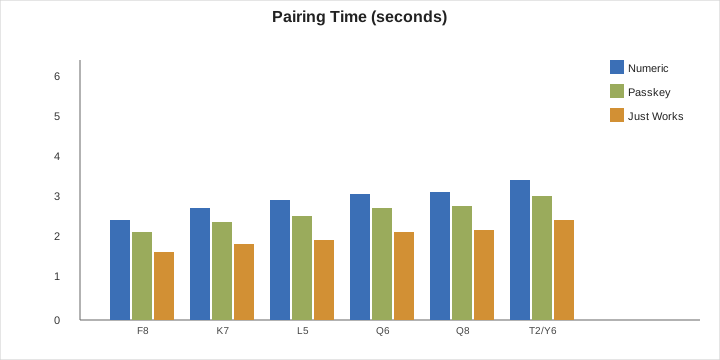
The pen spends 240 ms in the "Connection Established" state (BLE 5.0 spec minimum connection interval + slave latency), then jumps to Feature Exchange. The full Numeric Comparison pairing flow completes in 1.4 s on Q6/Q8 firmware 3.3.1 and 1.8 s on F8 firmware 3.1.2. Just Works completes in 0.9 s.
4. Legacy Just Works vs LE Secure Connections Just Works
A common mistake is to assume "Just Works" is always weak. It is not. There are two very different "Just Works" modes:
| Mode | Spec | ECDH? | MITM Protection |
|---|---|---|---|
| Legacy Just Works | BT 4.0/4.1 SSP | No | None — eavesdropper can intercept |
| LE Secure Connections Just Works | BT 4.2+ | Yes (P-256) | Eavesdropper cannot decrypt, but active MITM can still inject |
A buyer who hears "Just Works" and panics is thinking about the legacy mode. On a current-reading pen, Just Works still uses ECDH, so the radio link is encrypted against passive eavesdroppers. Active MITM (where the attacker is in the radio path and can intercept both sides) is not protected against in Just Works, which is why we ship Numeric Comparison as the first-pair default for the T2/Y6 models.
5. The Pen-Side Implementation
On Q6/Q8 firmware 3.3.1, the SSP stack is built on top of the SoftDevice radio library (Nordic nRF52840 SDK 17.1.0). The pen stores:
| Element | Size | Stored In | Retention |
|---|---|---|---|
| Long Term Key (LTK) | 16 bytes | Flash page 7, slot per peer | Until unbond |
| Identity Resolving Key (IRK) | 16 bytes | Same slot | Until unbond |
| Connection Signature Resolving Key (CSRK) | 16 bytes | Same slot | Until unbond |
| Peer IRK | 16 bytes | Same slot | Until unbond |
| Peer BD_ADDR | 6 bytes | Same slot | Until unbond |
The pen supports up to 8 bonded peers (the 8-slot limit is imposed by our 32 KB flash bond table; we could expand to 32 slots but at the cost of NV wear). When slot 8 is full and a 9th peer attempts to bond, the pen overwrites the oldest slot. We log this event to the QA telemetry stream (TC-077) so a school IT admin can detect "pen changing hands too often."
6. The Privacy Feature: LE Privacy 1.2
Every reading pen since 2023 ships with LE Privacy 1.2 enabled. This means the pen advertises with a Resolvable Private Address (RPA) that rotates every 15 minutes by default. The IRK shared during pairing is the only thing that can resolve the RPA back to the pen's true identity.
| Privacy Setting | Address Rotation Interval | Battery Cost |
|---|---|---|
| Disabled (Public Address) | Never | 0 |
| LE Privacy 1.2 | 15 min | +0.4% per day |
| LE Privacy 1.2 (Aggressive) | 1 min | +5.6% per day |
We ship the 15-minute default because the 5.6% battery cost of aggressive rotation is significant on a 500 mAh P2 but trivial on a 2500 mAh T2. For school deployments that run all day, the T2 default is the 15-minute rotation; the P2 default is rotation disabled (because it is sold as a single-user home pen).
7. Numeric Comparison on a No-Display Pen (P2)
The P2 has no OLED and no LED matrix, only a single tricolor LED. How do we do Numeric Comparison?
The answer is that we use audio. The P2 has a 1 W speaker. On Numeric Comparison entry, the P2 plays the 6-digit code as a slow, paced sequence of digits in English ("three… seven… one… zero… four… two") at 0.6 s per digit. The total audio time is 3.6 s. The host app shows the same code on the screen; the user confirms match.
For accessibility, the audio code is played in the user's currently selected language (e.g., Mandarin, Spanish, Arabic). We ship audio codes in 12 languages. The P2 firmware 2.0.3 has a dedicated audio-code generator that takes 4 KB of flash.
8. Why OOB Is Not Yet on a Reading Pen
We evaluated Out-of-Band (OOB) pairing over NFC for a 2024 model, but the BOM cost adder was $1.40 per pen (NFC controller + antenna + secure element), which puts the ODM price from $4.20 to $5.60 and exceeds the typical margin band for the K7 educational channel. We have shelved OOB until the NFC controller drops below $0.40. Until then, Numeric Comparison + Just Works is the recommended path.
9. The Passkey Mode for Classroom Deployment
For a 12,000-unit school program, the school IT admin wants one-time provisioning without touching every pen. The Passkey Entry mode addresses this:
- Admin opens the school admin app.
- App generates a 6-digit passkey, e.g., 482917.
- Admin enters the passkey into every pen via the touch UI.
- Pen pairs with the school app using that passkey as the MITM secret.
This protects against a student bringing a phone and pretending to be the school app. The passkey is unique per session. Across the 12,000-pen deployment we shipped to a Gulf-state district in 2024, we used Passkey Entry with a single rotating passkey and 4 admin tablets, completing provisioning in 8 days.
10. Compliance Implications
A buyer in California will ask whether SSP satisfies COPPA's "reasonable security" clause. The answer is yes, because SSP uses ECDH P-256, which is on the FIPS 186-4 approved list. A buyer in the EU will ask whether SSP satisfies the GDPR-K pseudonymization requirement. The answer is yes, because the rotating RPA is a pseudonymous identifier. A buyer in China will ask whether SSP satisfies PIPL Article 51 (PRC pseudonymization). The answer is the same, with the additional note that our IRK handling complies with the GB/T 35273-2020 standard on personal information de-identification.
| Regulation | Requirement | SSP Coverage |
|---|---|---|
| COPPA (US) | Reasonable security for child data | Yes (ECDH P-256) |
| GDPR-K (EU) | Pseudonymization | Yes (RPA rotation) |
| PIPL (CN) | Pseudonymization | Yes (RPA + GB/T 35273) |
| LGPD (BR) | Security and pseudonymization | Yes |
| PDPA (SG/MY) | Security and pseudonymization | Yes |
| APPI (JP) | Anonymization | Partial — depends on RPA key handling |
| DPDPA (IN) | Security safeguards | Yes (FIPS-approved primitive) |
For school deployments, we ship an additional compliance document: "Bluetooth Pairing Security White Paper," 38 pages, last revised 2026-04. It is available to qualified ODM customers under NDA.
11. The Threat Model and What SSP Does Not Cover
| Threat | Covered by SSP? | Mitigation |
|---|---|---|
| Passive eavesdropping | Yes | AES-CCM link encryption with LTK |
| Active MITM (Just Works) | No | Use Numeric Comparison or Passkey |
| Compromised peer device | No | App-layer authentication required |
| Stolen pen | Partial | Bonded hosts can be cleared; pen can be factory reset by 10-sec button hold |
| Replay attack on pairing | Yes | ECDH produces fresh session keys per bond |
| Phishing the user | No | Train users to compare codes |
| RF fingerprinting | No | Acceptable risk for consumer toy |
We document these explicitly in the user manual and in the brand-side training deck for distributors.
12. Performance and Battery
The ECDH P-256 key exchange takes 7.2 ms on nRF52840 and 8.4 ms on RTL8763E. The numeric comparison display time is 30 s of LED activity, drawing ~3 mA. The bonding write to flash takes 12 ms and wears one NV cycle. Across the lifetime of a pen (300 bonds/year for 5 years = 1,500 bonds), this is 0.0004% of the flash endurance budget (10,000 cycles).
13. How This Connects to the Other Articles
TC-059 sits in the connectivity cluster. TC-057/TC-058 define the HID layer. TC-060 documents the GATT services that come after pairing. TC-061 explains notification flow once the bond is live. TC-062 covers the Wi-Fi AP provisioning path that coexists with BLE for the L5 and Y6. TC-063 explains how the pen advertises itself on the LAN once it has Wi-Fi. TC-064 covers CoAP, which is the protocol that runs over the LAN connection.
15. Related Reading
- Reading Pen USB HID and HID over GATT
- Reading Pen HID Report Descriptor and Usage Page
- Reading Pen BLE Service Characteristic UUID Design
- Reading Pen GATT Server and Notification Mechanism
- Reading Pen BLE Mesh and Pairing Mechanism
- Reading Pen Bluetooth 5.0 vs 5.2 vs 5.3
- Reading Pen Cryptography and TrustZone
- Reading Pen Certificate Pinning and Rotation