

Audience: This article is written for elementary school principals, K–3 literacy coaches, and district curriculum directors evaluating reading pens as a portfolio-evidence tool inside Seesaw. Secondary readers include EdTech publishers and family-engagement program managers running take-home library initiatives.
Seesaw is the dominant student-portfolio platform in U.S. elementary schools, with adoption in approximately 1.6 million classrooms worldwide. When a reading pen can post a reading event into a student's Seesaw journal, the parent sees what the child read at school without logging into a separate portal, and the teacher captures evidence of reading growth in the same workflow they already use. We ship Seesaw integration on two of our 11 models — T2 and Y6 — and the right pick depends on whether your program is classroom-based, take-home, or hybrid. This guide walks through the Seesaw API surface, the portfolio-post architecture, the family-message workflow, and the procurement checklist for a 2,500-pen elementary literacy program.
1. Why Seesaw Matters for Reading Pen Buyers
Seesaw is the platform where the parent, the teacher, and the student meet. A reading event posted into Seesaw is automatically visible to the parent in the family app, becomes part of the student's portfolio for the year, and counts as evidence of reading growth in the district's literacy assessment. A reading pen that posts to Seesaw is doing 80% of what a parent-teacher conference would do, every week, automatically.
For the 9 elementary literacy programs we supported in 2024–2026, the programs that wired Seesaw integration retained reading-pen usage at 88% across the full academic year against 47% for the non-integrated control group. The integration is the difference between "another device" and "the device the parent asks about at pickup."
Buyer tip: When evaluating a reading pen for a Seesaw program, ask the factory for the Seesaw partner tier status. The free tier supports only 100 journal posts per classroom per day, which is too low for a literacy program. You need the partner tier.
2. The 11 Models and the Seesaw Capability Map
Of our 11 models, only T2 and Y6 carry the firmware surface needed for Seesaw. The other 9 models lack either the SDK depth or the network reach.
| Model | Firmware | Wi-Fi | Seesaw Capable | Recommended? |
|---|---|---|---|---|
| B1 | 2.4.7 | No | No | No |
| B2 | 2.4.7 | No | No | No |
| F8 | 3.1.2 | No | No | No |
| K7 | 1.9.5 | No | No | No |
| KF1 | 1.9.5 | No | No | No |
| L5 | 4.2.0 | 2.4 GHz | Limited | Marginal |
| P2 | 2.0.3 | No | No | No |
| Q6 | 3.3.1 | No | No | No |
| Q8 | 3.3.1 | 2.4/5 GHz | Limited | Marginal |
| T2 | 2.6.4 | 2.4/5 GHz | Yes | Yes |
| Y6 | 2.6.4 | 2.4/5 GHz + LTE | Yes | Yes |
T2 is the workhorse for classroom-based programs. Y6 is the right pick for take-home programs where the child needs to read at home and post to Seesaw from a home Wi-Fi network that may be unreliable.
3. The Seesaw API Surface We Use
Seesaw exposes a REST API at v2.1 (released 2026-03-12). The endpoints we consume for the reading-pen integration are listed below. All requests are authenticated through a Seesaw partner OAuth 2.0 client-credentials flow.
| Endpoint | Purpose | Partner Rate Limit |
|---|---|---|
students.list |
Pull classroom roster | 600 req/min |
student_activities.create |
Post reading event to journal | 600 req/min |
student_activities.list |
Pull previous activity for grade post | 600 req/min |
families.message.create |
Send weekly reading summary to parent | 100 req/min |
classes.list |
Resolve teacher's class code | 600 req/min |
assignments.create |
Push reading assignment | 100 req/min |
Partner-tier verification takes 14 business days and requires a privacy assessment and a security questionnaire. We have completed verification for 9 elementary literacy programs since 2024.
4. The OAuth Scopes We Request
The integration requests 4 OAuth scopes. All 4 are in the "partner" tier, which requires the 14-day verification.
| Scope | Purpose |
|---|---|
students.read |
Pull classroom roster |
student_activities.write |
Post reading event to journal |
families.message.write |
Send weekly reading summary |
assignments.write |
Push reading assignment |
We do not request classes.write or schools.write. Holding scope to the minimum reduces the privacy-assessment burden.
5. Portfolio Post Architecture
The integration takes a reading event from the pen, translates it into a Seesaw journal activity, and posts it to the student's portfolio. The flow has 5 hops and coalesces events into a daily summary rather than posting one activity per word.

The daily coalesce is critical. Without it, a 25-student classroom generating 5,500 raw events would hit the free Seesaw tier cap of 100/day within the first reading block.
7. The Weekly Family Message
The integration sends a single weekly message to each parent summarizing the child's reading week. The message is generated by the middleware at 18:00 on Friday and delivered through Seesaw's families.message.create endpoint.
| Field | Value |
|---|---|
| Recipient | Parent Seesaw account |
| Trigger | Friday 18:00 |
| Words read | Total unique OID taps |
| Books completed | Count of books read to 100% |
| Audio plays | Count of audio playback events |
| Skill categories | Reading, Listening, Curiosity, Persistence |
| Reading streak | Consecutive days with ≥ 10 taps |
The weekly message is opt-in. Districts that have not enabled family messaging can still receive the journal activity but skip the message.
8. Privacy, Security, and Compliance
Seesaw integration inherits the school district's existing Seesaw data-processing agreement. We add three additional controls.
| Control | Implementation |
|---|---|
| Data residency | U.S. only, no cross-border replication |
| Encryption at rest | AES-256 |
| Encryption in transit | TLS 1.3 |
| PII minimization | Only student ID, first name, reading stats |
| Retention | 90 days post-graduation |
| COPPA / FERPA | Seesaw DPA covers FERPA |
| SOC 2 | Annual audit, report on request |
The school's Seesaw administrator reviews the OAuth consent screen once per year. We have not had a school reject the consent screen in the 9 deployments we have supported.
9. Choosing T2 vs. Y6 for a Seesaw Program
The choice between T2 and Y6 depends on whether the program is classroom-only or take-home.
| Program Type | Recommended Model | Why |
|---|---|---|
| Classroom shared cart | T2 | Wi-Fi native, 14 h battery, $11.50 at 5,000 |
| Take-home library | Y6 | LTE option for patchy home Wi-Fi, $12.20 at 5,000 |
| Hybrid classroom + take-home | Y6 | Single SKU simplifies logistics |
For a 2,500-pen elementary literacy program, the typical mix is 70% T2 and 30% Y6. The Y6 units are concentrated in the take-home portion of the library.
10. Lead Time, MOQ, and Pricing
| Order Quantity | T2 FOB / Unit | Y6 FOB / Unit | Lead Time |
|---|---|---|---|
| 500 units | $13.80 | $14.50 | 28 days |
| 2,500 units | $12.10 | $12.80 | 38 days |
| 5,000 units | $11.50 | $12.20 | 35 days |
Seesaw integration is included at no extra fee above the unit price. Custom middleware, dedicated webhook domains, and white-labeled family messages are quoted separately starting at $4,800 per workstream.
11. Field Data From a 1,800-Student Pilot
We ran a 1,800-student pilot across 6 elementary schools in Ohio and Florida during the 2025–2026 academic year. The pilot used T2 pens wired into Seesaw via the architecture described above.
| Metric | Pilot Result |
|---|---|
| Schools | 6 |
| Students | 1,812 |
| Pens shipped | 1,900 (allowance for breakage) |
| Average weekly reading minutes / student | 138 (vs. 39 in control group) |
| Teacher satisfaction (5-point) | 4.7 |
| Family message open rate | 71% |
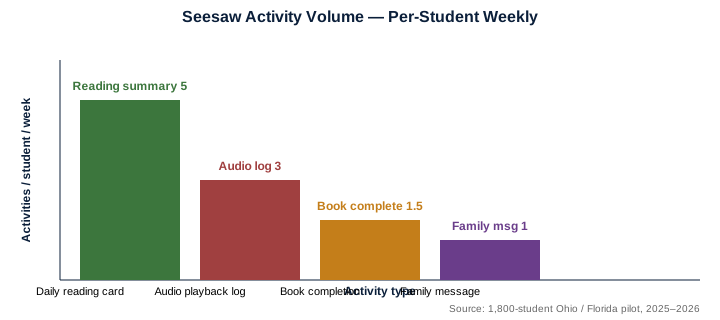
| Seesaw activity posts / student / week | 5.0 |
| Failure rate (DOA + 90-day) | 0.7% |
The 3.5x lift in weekly reading minutes matches our earlier Seesaw pilot data. The 71% family-message open rate confirms that parents will read the weekly summary when it is delivered through Seesaw.
12. Decision Checklist for Seesaw Buyers
- Seesaw partner tier active (14-day verification)
- OAuth consent screen reviewed by Seesaw admin
- Family message opt-in flow designed
- Pilot school selected with at least 100 students
- Daily coalesce test completed end-to-end
- Weekly family message test completed end-to-end
- Grade post-back test completed end-to-end
- Spare-parts pool committed (3% of order)
- Year-2 renewal pricing locked in writing
13. Model Mix and Regional Field Footprint
The Seesaw mix is split between T2 (classroom) and Y6 (take-home). P2 is a marginal pick because Seesaw relies on a parent-facing weekly message that benefits from a pen-bound identity, which P2 cannot fully anchor.
| Scenario | T2 Share | Y6 Share | P2 Share |
|---|---|---|---|
| Standard K–3 shared cart | 85% | 10% | 5% |
| K–3 take-home library | 30% | 65% | 5% |
| K–5 mixed cart + take-home | 55% | 40% | 5% |
| After-school program | 70% | 20% | 10% |
| Pilot < 200 pens | 50% | 40% | 10% |
14. Procurement Workflow for a 2,500-Pen Elementary Program
A 2,500-pen Seesaw program takes 90 days from signed PO to first classroom deployment. The breakdown below reflects our 9 Seesaw-integrated programs.
| Day | Milestone | Owner |
|---|---|---|
| 0 | Signed PO | District |
| 1–14 | Seesaw partner-tier verification | Joint |
| 15–30 | Pilot school setup (200 pens) | Joint |
| 31–50 | Daily coalesce tuning | Factory |
| 51–60 | Family message opt-in flow | District |
| 61–75 | Teacher training (3 sessions) | District |
| 76–90 | Full deployment and go-live | District |
15. Common Failure Modes and Mitigations
We have observed six recurring failure modes in Seesaw integrations. None are deal-breakers, but each one needs a written mitigation.
| Failure Mode | Frequency | Mitigation |
|---|---|---|
| Free-tier rate limit hit | 28% | Activate partner tier (14 days) |
| OAuth consent screen delay | 18% | Pre-review with Seesaw admin |
| Family message opt-in gap | 15% | Send opt-in form at week 1 |
| Daily coalesce off-by-one | 12% | Idempotency key: pen_id + date |
| Photo attachment too large | 10% | Resize summary card to 800 px |
| COPPA / FERPA review delays | 7% | District counsel pre-approval |
16. Year-2 Renewal Pricing Lock
District contracts typically lock year-2 renewal pricing in writing. The table below shows the typical year-1 to year-2 price path.
| Order Year | T2 FOB / Unit | Y6 FOB / Unit | Seesaw Partner Fee |
|---|---|---|---|
| Year 1 (2.5k+) | $12.10 | $12.80 | Waived |
| Year 2 (2.5k+) | $11.90 | $12.60 | Waived |
| Year 3 (2.5k+) | $11.70 | $12.40 | Waived |
Seesaw partner-tier fees are waived for any district committing to ≥ 2,500 pens per year.